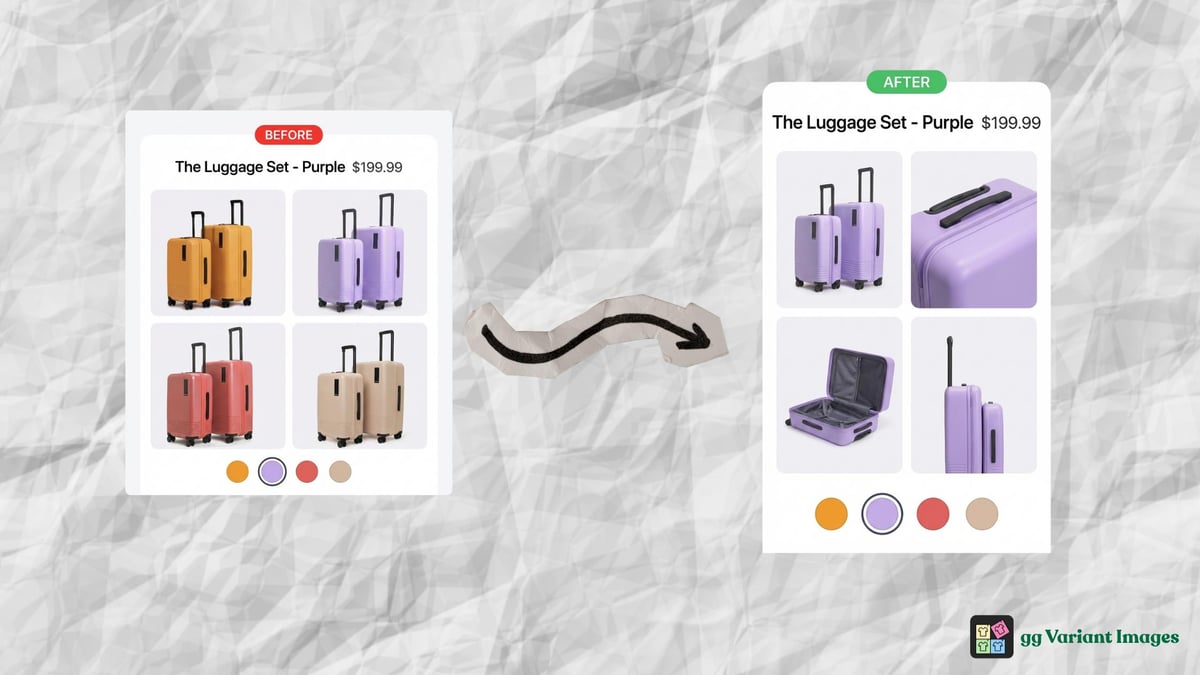
Show only selected variant images: that is what most Shopify merchants with color, material or style variants actually want, and it is not what Shopify does out of the box. If you sell products in multiple colors, materials, or styles, you’ve probably run into this: a customer selects “Black” and the page still shows the red version front and center. Getting Shopify variant-specific product images right is one of the most overlooked conversion fixes. And it’s not something Shopify handles out of the box.
This post walks you through what Shopify variant-specific product images actually are, why Shopify’s native setup falls short, and how to get it working properly without touching any code.
What “variant-specific product images” actually means
When merchants say variant-specific images, they usually mean one of two things.
The first is a featured image per variant. Shopify supports this natively. You go into a variant in the product editor, assign an image, and that image shows when the customer selects that option. It’s useful, but limited.
Step-by-step for the native one-image method: how to add variant images on Shopify.
The second is a full image gallery per variant. This means when someone selects Black, they see 3-4 images of the black version. When they switch to Red, the gallery swaps to show 3-4 different images. Only the red ones. No black images bleeding through.
That second thing is what most merchants actually want. And that’s what Shopify doesn’t support natively.
The gap in Shopify’s native variant image handling
Here’s exactly what Shopify gives you out of the box:
- One featured image per variant (shows as the main image on selection)
- A shared product gallery that doesn’t change based on variant
So if your product has 12 images total (3 per color, 4 colors), Shopify will show all 12 in the gallery regardless of which color the customer picks. The featured image will swap, but the rest of the gallery stays the same.
For simple products, this is fine. For anything with meaningful visual differences between variants, it creates a confusing browsing experience. Customers see images that don’t match what they selected. That creates doubt, and doubt kills conversions.
If the image does not switch at all when a shopper picks a variant, that is a different problem: Shopify variant image not changing.
Three ways to fix Shopify variant-specific product images
1. Create separate products per variant
Some merchants split each color into its own product (Black Pump, Red Pump, Yellow Pump) and use a color swatch app to link them together visually.
This works, but it has real costs. Your inventory gets split across multiple product pages. SEO gets diluted. Analytics get fragmented. And the maintenance overhead adds up every time you update a product.
Not recommended unless you have a strong reason for it.
2. Custom theme code
A developer can modify your theme’s product template to listen for variant selection and show/hide images accordingly. This gives you full control and zero app overhead.
The downside: it’s custom code on a custom theme. Every time Shopify or your theme updates, something can break. You’re on the hook for maintenance. And the initial build cost isn’t trivial.
Good option if you have an in-house developer. Not practical for most merchants.
3. Use an app
Apps handle the complexity for you. You assign images to each variant through a simple UI, and the app handles the storefront filtering. No code, no maintenance, no Shopify expertise required.
This is what most merchants end up doing, and for good reason. It works, it’s fast to set up, and it keeps working when Shopify updates things under the hood.
How to show only selected variant images on Shopify
“Only” is the important word. When a shopper picks Red, the main gallery, the thumbnail strip, the dots and the zoom view should all drop every non-red photo, not just scroll past them. Shopify’s native variant image can’t do this because it only knows one image per variant and never removes the rest. An app that reads your per-variant assignments and filters the gallery on every switch is the only way to show only selected variant images on Shopify. Each theme builds its gallery differently (Dawn, Horizon, Impact, Prestige, page builders like Foxify and Instant), so the filtering has to be written per theme. gg Variant Images ships a handler for each.
Add multiple images to one variant
Most apparel products need three to eight photos per color: front, back, detail, on-model. To add multiple images to one variant, open the product in gg Variant Images, pick the Color option, and assign every red photo to Red by drag and drop. Drag again to set the order shoppers see. If you have many products, auto-assign reads the image file names and alt text and sorts them into variants in one click; you review and save. Nothing changes in Shopify’s product admin, so your existing featured images keep working for collection pages.
Hide variant images that don’t match
Hiding is better than reordering. Reordering still leaves the other colors a few swipes away; hiding removes them from the gallery until that color is picked. gg Variant Images hides non-matching images on the storefront only, through a theme app embed. Images you leave unassigned, like size charts or lifestyle shots, are treated as shared and stay visible for every variant. No theme files are edited, and turning off the embed restores the full gallery instantly.
Setting it up
The step-by-step setup, both the native one-image method and the app method for multiple images per variant, lives in the tutorial: How to add variant images on Shopify. In short: install gg Variant Images, assign images to each variant in Configure, turn on the app embed in the theme editor, save. Under ten minutes, no code.
Does it work with your theme? (Yes, even for shopify variant-specific product images)
gg Variant Images works with the most popular Shopify themes including Dawn, Craft, Horizon, Sense, Refresh, and most free themes from the Shopify Theme Store. Theme guides: Horizon theme guide.
If you’re on a custom or premium theme and it isn’t working correctly, reach out and we’ll add support for your theme within 48 hours. Just send us the theme name and we’ll handle it.
Common questions
Do I need to know how to code?
No. The entire setup happens through a point-and-click UI in your Shopify admin. No liquid, no JavaScript, nothing.
Will this slow down my store?
No meaningful impact. The app uses a lightweight theme extension that only activates on product pages. It reads the assignments you’ve saved and filters the gallery on variant selection.
What happens to images I don’t assign to any variant?
They become common images and show for all variants. This is intentional. It’s useful for images that aren’t variant-specific, like a brand lifestyle shot or packaging detail, but still belong on the product page.
Does it work if a customer hasn’t selected a variant yet?
Yes. Before any selection, the page shows the default variant’s images (whichever variant Shopify loads first). Once a customer selects a different variant, the gallery updates.
Is it actually free?
The Free plan covers one product, no credit card required, so you can test on a live product first. Growth is $9.99 a month for 100 products and Pro is $19.99 a month for unlimited products.
If you’re selling products where variant appearance matters, getting this right is worth the 10 minutes. Customers shouldn’t have to second-guess whether the image they’re looking at matches what they’re about to buy.
Getting Shopify variant-specific product images right is one of the highest-ROI changes you can make to a product page. Customers shouldn’t have to second-guess whether the image they’re looking at matches what they’re about to buy.
Install gg Variant Images on the Shopify App Store (Free plan for one product) →
Related: how to add variant images on Shopify · Shopify variant image not changing · best Shopify apps for clothing stores