ggApps Install gg Variant Images Free

Your shoppers pick a variant.
Show them only those images.

When someone picks "Black", why are they seeing the red, blue, and green versions too? gg Variant Images fixes that. No code, no complicated setup.

Free to install. Works with any Shopify theme.
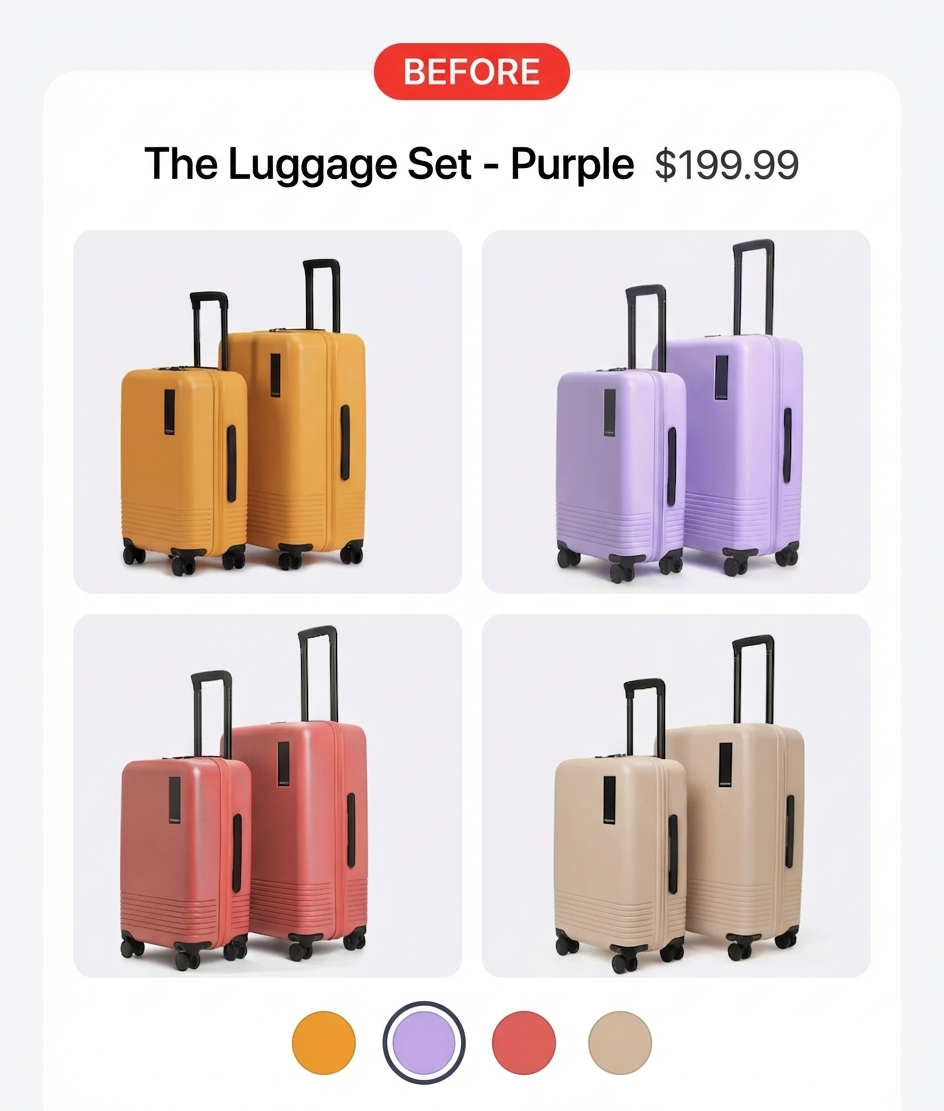
Before gg Variant Images — all product images shown regardless of selected variant
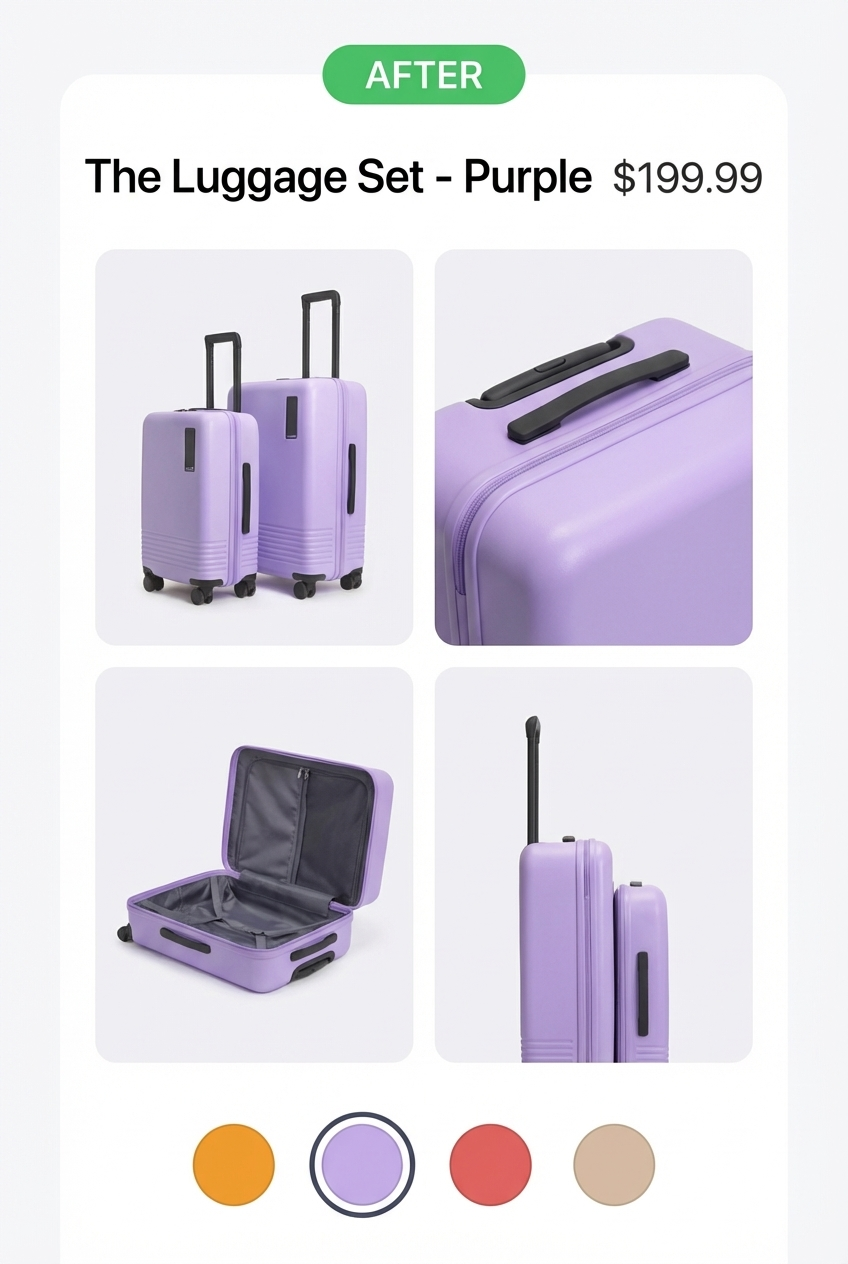
After gg Variant Images — only relevant images shown for the selected variant

Works with Dawn, Horizon, Craft, Refresh, Sense, Crave, Publisher and more. Not on the list? We'll make it work within 48 hours.

How it works

Up and running in 3 steps.

No developer needed. No theme edits. Just install, assign, and you're done.

Step 1

Assign images to variants

Open any product in the app. Drag your images onto the right variant. Takes about 2 minutes per product.

Step 2

Enable the app embed

One toggle in your Shopify theme settings activates the app on your storefront. No code, no liquid edits.

Step 3

Watch it work

Visit any configured product page. Pick a variant. Only the right images show. Your shoppers finally see a clean gallery.

Features

Everything you need. Nothing you don't.

Assign by any option

Color, Size, Material. Assign images to whatever option type makes sense for your product.

Common images for all variants

Some images belong everywhere: lifestyle shots, packaging, size guides. Mark them once, they show for every variant.

Drag & drop ordering

Control which image comes first. The order you set in the app is the order your shoppers see.

No flicker on variant switch

Images swap instantly when a shopper picks a variant. No flash, no reload, no janky transition.

Works with any Shopify theme

Dawn, Horizon, Craft, Refresh, Sense, Crave, Publisher and more. Not on the list? We'll make it work within 48 hours.

Free to get started

Install for free and set up your first products. No credit card needed to see if it works for your store.

The real problem

Shopify shows every image, always. That's the default. It's a bad default.

You spend time getting great photos for each variant. Black version, silver version, red version. But when a shopper lands on your product page and picks "Black", Shopify still shows all 12 images. The red ones. The silver ones. All of them.

It's confusing. Shoppers second-guess themselves. They wonder if they're on the right page. They leave.

gg Variant Images fixes this. When someone picks Black, they see the Black images. When they switch to Red, they see the Red images. The images that belong to all variants (lifestyle shots, size charts) stay visible throughout. Simple.

Fix it on my store →
FAQ

Questions we get a lot.

It works with Dawn, Horizon, Craft, Refresh, Sense, Crave, Publisher, and more. If it doesn't work with your theme, install the app and reach out to us. We'll make it compatible within 48 hours.
No. You install the app, enable the app embed in your theme editor (one toggle), and you're done. No liquid edits, no developer needed.
Some images make sense for every variant: a lifestyle shot, a size guide, packaging. Any image you don't assign to a specific variant automatically becomes a common image and shows up for all variants.
No. The app uses a lightweight script that only runs on product pages. It won't affect your PageSpeed score or Core Web Vitals.
You can configure products one by one from the app. We're working on bulk assignment tools. If that's critical for you, let us know and we'll prioritize it.
Yes. Install for free and get started. We'll be transparent about pricing as the app grows.
From the blog

Learn more about variant images.

All posts →

Ready to clean up your product pages?

Takes 5 minutes to install and set up your first product. Free to get started. No credit card.

Install on Shopify. It's Free.

Works with any Shopify theme.